Sunday, 27 November 2011

A Charity Website

instruction

Our first assignment on the UWE Introduction to the Web Module has been to complete this blog, a 1000 word report on the blog and a 3-page website for a charity. I've been looking forward to making a website and immediately tried to find a charity who needed a website. However, this didn't prove easy and with time at a premium I decided to create a website for a fictitious environmental charity.


inspiration

My first thought for an environmental charity was Polar Bears as there is a rather iconic image of a Polar Bear stood on a very small iceberg. This image always reminds me of the bear on the foxes glacier mints package. So I thought I'd change the reason for the Polar Bear's plight from Global Warming to the mints disappearing!


perspiration

The design I chose was mostly from my imagination but the layout was inspired from a blog post from KISS metrics on the anatomy of a perfect landing page. I eventually changed the design (once I had coded my website frontpage and realised I needed another page of content), but the original draft, made in fireworks, looked like this...


Notice how the "call to action" text and button is highly contrasted against the blue. I've used palettebuilder to help me with the colour scheme.

I chose to use font's from fontsquirrel as they are free to use and provide all the files and css needed. I put this css in a different folder so that my main css file would validate.


precipitation

I wanted to add some Javascript to the website and found a neat snow generator which I thought would be quite fun. Unfortunately it's a little CPU intensive as there are a lot of flakes on the screen however this was the best of the 3 that I tried.

Bad Form

The most troublesome part of the website for me was the form. I think the main problem was that I didn't plan this before hand and jumped straight into designing in HTML and CSS. The problem came when testing the site in different browsers. I'm still not happy with how some of the radio buttons and checkboxes look in Opera and IE.

Monday, 14 November 2011

Well Behaved Javascript

Javascript


This week we've covered Javascript. For me this is the most exciting thing we've covered so far on the course as I've had very little exposure to it before. I have created sites that have used JQuery plug-ins - a Javascript library that helps simplify coding but until now had not written any code. Javascript enables web pages to respond to events such as the web page loading or a click of a mouse on a button.


Here is a link to a prototype of my personal site landing page. I've written some code (with the help of the W3Schools tutorial) that reacts to the browser window either loading, or being resized, and changes the font size based on the width of the screen. (Other responsive elements are created by using percentages (eg. Width = 100%) in the CSS).


Lab Sessions


In the lab sessions we looked at some examples of event driven Javascript and I created a Miles to Kilometers converter and an example of an onMouseOver event.


Additions to the blog

I've made a few additions to the blog in the form of gadgets. I've added a pop-up form for subscribing to the feedburner. This involved editing the HTML of the blog rather than adding in a HTML/Javascript gadget as the notes on the lab session exercise. It's interesting to see the options from the template designer are being used as variables in the Javascript for the page.

Thursday, 3 November 2011

Responsive CSS

960 grid designs

960 is a great number. You can divide it by 2, 3, 4, 5, 6, 8, 10, 12, etc. and 960 pixels fits inside most modern desktop screens. It's great for using with grids and there is a fantastic resource available called 960.gs where you can download all sorts of 960 related templates. To use a 960 grid create a div with an ID of wrapper in your HTML...
  <body>
    <div id="wrapper">
...and in your css use the auto attribute of the margin property, like so...
  #wrapper {
  width: 960px;
  margin: 0  auto;
  }
...which will automatically centre the div in the middle of your browser window!

Desktop Dinosaurs

I've been looking at responsive web design as there is a growing need to accomodate screen sizes smaller than desktops. 960px is fine if you have a decent screen, but no good for notebooks or smart phones. By using @media queries in your CSS you can specify different styles for different screen sizes (and different media such as the printed page) as this a list apart article demonstrates. You can also be responsive so screen sizes by using %ages instead of fixed pixel widths on elements.


In the lecture/lab session

This week we looked at more CSS in the lecture and practiced it in the lab session. Dan spoke about inline and block elements again. A block element spans the page, whereas an inline element doesn't. Therefore block elements can contain inline elements, but inline elements cannot contain block elements. It's useful to be able to change an inline element such as an anchor to a block so that you can set it's width as demonstrated in this week's lab session exercise: creating a horizontal navigation bar with hover-effects.

Saturday, 29 October 2011

CSS3 reference

Everything you wanted to know how to do in CSS3 and more!

Thursday, 27 October 2011

Creating Web Sites with Style

Style with CSS

To create websites with style we should turn to Cascading Style Sheets. CSS can be used as either an external document referenced by adding

<link rel="stylesheet" type="text/css" href="style.css" />

to the html head, including it within the HTML head section or within the each individual HTML element. I find it simpler to use an external file as any changes can affect all documents linked to it. Some good resources for CSS are w3schools and brainjar.


The BOX model

The Box model is a simple analogy for how some of the css properties behave. Essentially most HTML elements are blocks that contain content. Surrounding this content you have a border, however you may want to have some space between your border and the content, this is called padding. Outside of your block (and it's border) you can separate the element from other HTML elements with a margin. Here's how it looks...


Styling this blog

To style this blog I used the Blogger Simple template and changed the CSS using the advanced options. I choose a simple colour scheme of a white background #336699 (a grey blue), some greys, and a greyish red #993333 for the hover-over effects.

Within the advanced options of the Blogger Design module you can add in your own additional CSS. To do this I viewed the Source code using Firebug in order to find out the names of the HTML element classes. I altered the positioning of some of the elements to make it all nicely lined up. I also inserted a graphic next to my title using code gleaned from uploading custom background images.

Thursday, 20 October 2011

Markup, Sectioning and Layout

Blog Entries

This week we got our first assignment. It's to produce this blog, a website for a charity (fictitious) and a report on both. I'm going to be exploring blogging and writing about the lectures and lab sessions I've done each week, as well as providing links to the exercises I've completed.


An intro to Markup, Sectioning and Layout

The lecture this week was discussing Markup, Sectioning and Layout which all happens in HTML. Dan Buzzo, our lecturer for Introduction to the Web (ITTW), spoke about how HTML handles the Structure of the webpage, whereas CSS handles the Style, and Javascript the Behaviour. This idea of a trinty of tools for building web-pages struck a chord with me so I made this cute little diagram using the HTML5 logo.

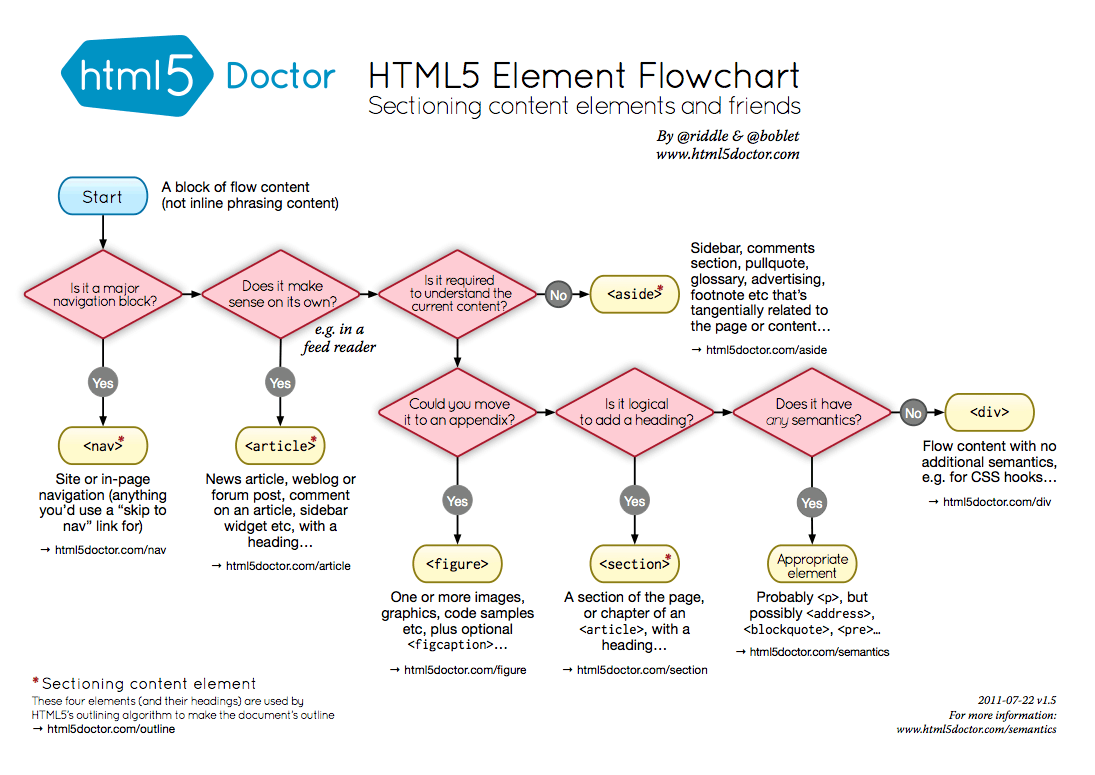
In ITTW we are casting an eye on what is going to happen in Web Development in the near future so we discussed HTML5, which is fast becoming the next standard mark-up language. It takes web page structure to the next level as there are far more specific elements that can be used. Elements are the individual components of the HTML code and are used in a tree-like arrangement. Dan Buzzo used a flow chart of how to use elements in HTML5 to help the HTML5 writer determine how to correctly use these new elements.

My first UWE page

In the first few lab sessions we have created a basic UWE homepage from a HTML 3.2 doctype and updated it to HTML 4.1 standard document. I've added a few enhancements including a separate css file for the styling.

Tuesday, 18 October 2011

Dos and Don'ts of Infographic Design

This article from Smashing Magazine has some great advice on creating infographics. This will come in handy for the assignment for Information Design module - creating a newsletter for a fictitious environmental group.

Monday, 10 October 2011

Typography

Here's a great history and discussion of typography on the web.

Hello World:)

Introduction to this blog

I've started this blog as part of my Web Design degree at the University of West of England. I've decided to study Web Design well, frankly, because I spend so much time on the internet I thought I should try and make a living out of it.

Motivation

For me, the internet has revolutionised communication and entertainment. I want to be part of this revolution and develop new forms of interactive content.  As a songwriter and guitarist I want to explore new ways of publishing music online.

Inspiration

I think I'm suited for the course as I enjoy figuring out out how things work, logic and reasoning and making things. I'm going to be letting my inner geek out: programming, apps, scripting, on-line databases... bring it on!
I also feel that I understand important aspects of web design: usability/user experience and what looks good on screen.
I have an artistic family: My Father, Sister, and Aunt are all accomplished artists and i've always appreciated good design and enjoy making things look pretty. So, in some respects, this will be an aesthetic and creative pursuit.

What's coming up on the blog

This blog will encompass things I've learn on my journey whilst at UWE, interesting articles and resources and examples of design that I love.

x

Get Our Latest Posts Via Email - It's Free

Enter your email address:

Delivered by FeedBurner