Saturday, 29 October 2011

Thursday, 27 October 2011
Creating Web Sites with Style
Style with CSS
To create websites with style we should turn to Cascading Style Sheets. CSS can be used as either an external document referenced by adding
<link rel="stylesheet" type="text/css" href="style.css" />to the html head, including it within the HTML head section or within the each individual HTML element. I find it simpler to use an external file as any changes can affect all documents linked to it. Some good resources for CSS are w3schools and brainjar.
The BOX model
The Box model is a simple analogy for how some of the css properties behave. Essentially most HTML elements are blocks that contain content. Surrounding this content you have a border, however you may want to have some space between your border and the content, this is called padding. Outside of your block (and it's border) you can separate the element from other HTML elements with a margin. Here's how it looks...

Styling this blog
To style this blog I used the Blogger Simple template and changed the CSS using the advanced options. I choose a simple colour scheme of a white background #336699 (a grey blue), some greys, and a greyish red #993333 for the hover-over effects.
Within the advanced options of the Blogger Design module you can add in your own additional CSS. To do this I viewed the Source code using Firebug in order to find out the names of the HTML element classes. I altered the positioning of some of the elements to make it all nicely lined up. I also inserted a graphic next to my title using code gleaned from uploading custom background images.
Thursday, 20 October 2011
Markup, Sectioning and Layout
Blog Entries
This week we got our first assignment. It's to produce this blog, a website for a charity (fictitious) and a report on both. I'm going to be exploring blogging and writing about the lectures and lab sessions I've done each week, as well as providing links to the exercises I've completed.
An intro to Markup, Sectioning and Layout
The lecture this week was discussing Markup, Sectioning and Layout which all happens in HTML. Dan Buzzo, our lecturer for Introduction to the Web (ITTW), spoke about how HTML handles the Structure of the webpage, whereas CSS handles the Style, and Javascript the Behaviour. This idea of a trinty of tools for building web-pages struck a chord with me so I made this cute little diagram using the HTML5 logo.

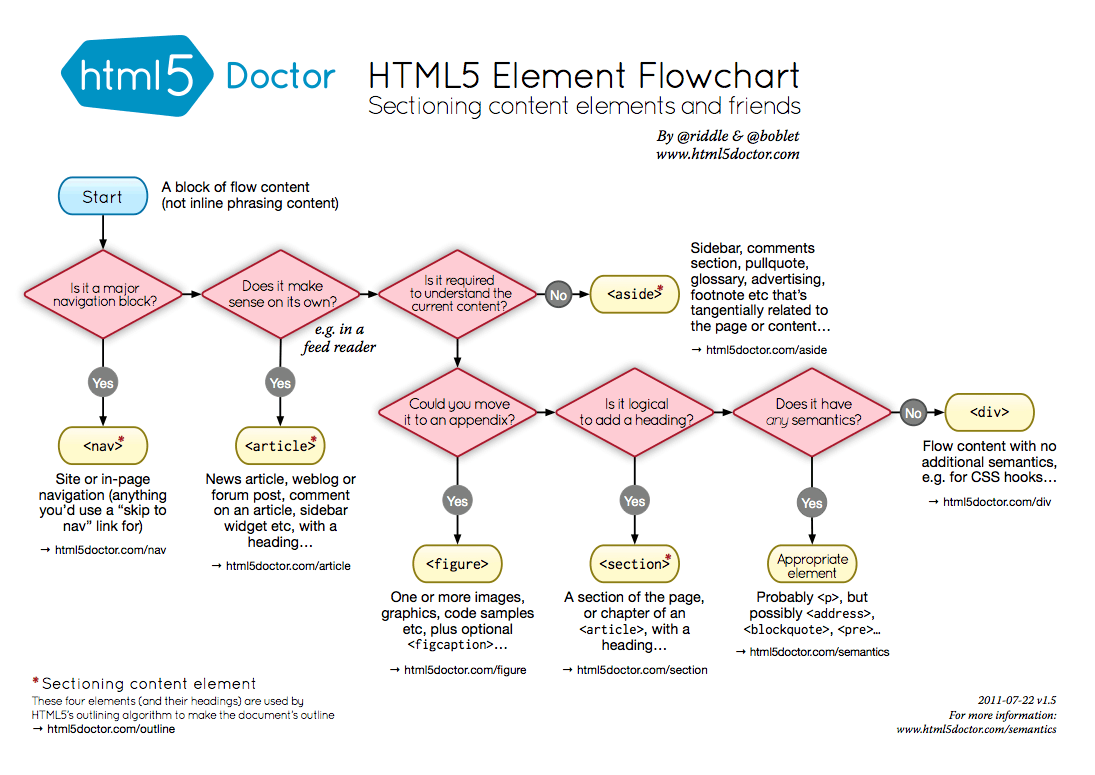
In ITTW we are casting an eye on what is going to happen in Web Development in the near future so we discussed HTML5, which is fast becoming the next standard mark-up language. It takes web page structure to the next level as there are far more specific elements that can be used. Elements are the individual components of the HTML code and are used in a tree-like arrangement. Dan Buzzo used a flow chart of how to use elements in HTML5 to help the HTML5 writer determine how to correctly use these new elements.
My first UWE page
In the first few lab sessions we have created a basic UWE homepage from a HTML 3.2 doctype and updated it to HTML 4.1 standard document. I've added a few enhancements including a separate css file for the styling.
Wednesday, 19 October 2011

Tuesday, 18 October 2011
Dos and Don'ts of Infographic Design
Monday, 17 October 2011
Wednesday, 12 October 2011
Monday, 10 October 2011
Hello World:)
Introduction to this blog
I've started this blog as part of my Web Design degree at the University of West of England. I've decided to study Web Design well, frankly, because I spend so much time on the internet I thought I should try and make a living out of it.
Motivation
For me, the internet has revolutionised communication and entertainment. I want to be part of this revolution and develop new forms of interactive content. As a songwriter and guitarist I want to explore new ways of publishing music online.
Inspiration
I think I'm suited for the course as I enjoy figuring out out how things work, logic and reasoning and making things. I'm going to be letting my inner geek out: programming, apps, scripting, on-line databases... bring it on!
I also feel that I understand important aspects of web design: usability/user experience and what looks good on screen.
I have an artistic family: My Father, Sister, and Aunt are all accomplished artists and i've always appreciated good design and enjoy making things look pretty. So, in some respects, this will be an aesthetic and creative pursuit.
What's coming up on the blog
This blog will encompass things I've learn on my journey whilst at UWE, interesting articles and resources and examples of design that I love.